
In the hyper-competitive landscape of 2026 gaming, your ability to keep your reticle glued to a moving target is the difference between a victory royale and a respawn screen. Tracking aim is a skill that separates casual players from esports professionals, but even the best aimers will struggle if their hardware or software settings are fighting against them.
If your game feels “floaty” or your frames drop during intense firefights, your tracking will inevitably suffer. This guide breaks down the essential optimizations to ensure your system provides the maximum clarity and responsiveness needed for pinpoint accuracy.
The Relationship Between Frame Rate and Tracking Aim
It is a proven fact in 2026: High FPS (Frames Per Second) is the foundation of superior tracking. When your frame rate is high, your monitor displays the most up-to-date position of your opponent. This reduces input lag and provides a smoother visual representation of motion.
<img alt="PEAK – Best FPS Settings for Smooth Gameplay – GamerHour" src="https://gamerhour.net/wp-content/uploads/2025/12/Screenshot20251229-185123YouTube-1536×854.jpg” style=”max-width:100%; height:auto; border-radius:8px; margin: 1rem 0;” />
If you are struggling to stay on target, the first step is to stabilize your frame rate. Fluctuating frames cause “stutter,” which forces your brain to constantly micro-adjust for visual jumps. By prioritizing a consistent frame rate, you create a fluid visual environment where your mouse movements translate directly to screen movement.
Optimizing In-Game Graphics for Competitive Advantage
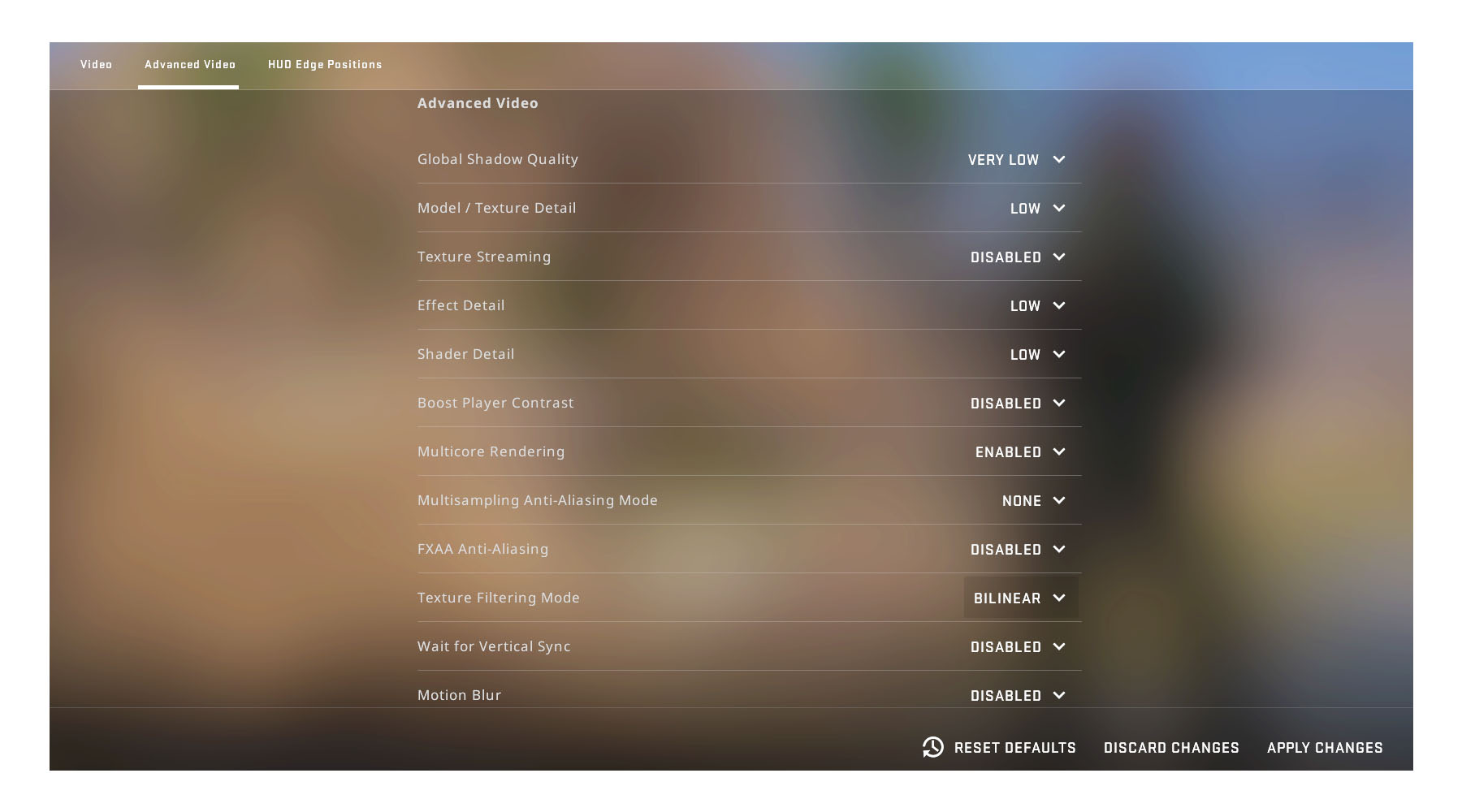
To achieve the best FPS settings for tracking targets, you must balance visual fidelity with raw performance. In modern titles, “Ultra” settings are often the enemy of competitive play because they introduce unnecessary visual clutter and particle effects that obscure your view of the enemy.
Essential Graphics Adjustments
- Resolution Scaling: If you are struggling with frame drops, lower your in-game resolution or use performance-oriented upscaling (like DLSS or FSR 3.1). A stable 240+ FPS is significantly more valuable than 4K textures.
- Disable Post-Processing: Turn off Motion Blur, Bloom, and Depth of Field. These settings create visual artifacts that make it harder for the human eye to track fast-moving targets.
- Texture Quality: Keep this at “Low” or “Medium.” This minimizes the load on your VRAM and ensures that the game engine focuses resources on frame delivery rather than asset rendering.
- Shadow Quality: Set to “Low.” Shadows often hide enemy silhouettes and consume significant GPU overhead.

Input Latency: The Invisible Barrier to Tracking
Tracking is not just about what you see; it is about how quickly your hand movements reach the server. Input latency is the primary culprit for “overshooting” or “undershooting” targets.
To minimize this in 2026, ensure that NVIDIA Reflex or AMD Anti-Lag is enabled in your game settings. These features synchronize the GPU and CPU to ensure the frame you see is the most recent one generated. Furthermore, ensure your polling rate is set to 1000Hz or higher on your gaming mouse to ensure your crosshair movement is as granular as possible.
Beyond Settings: The Practice Component
Even the best FPS settings for tracking targets cannot replace muscle memory. Once your system is optimized, you must engage in consistent aim training drills.
- Tracking Scenarios: Use aim trainers to focus on “smoothness.” Avoid flicking; instead, focus on maintaining a constant velocity that matches the target.
- Tracking Consistency: Spend 15 minutes a day on “tracking bots” that move in unpredictable patterns.
- Sensitivity Calibration: Ensure your sensitivity is low enough to allow for precise micro-adjustments but high enough to track targets crossing your entire screen.
Fine-Tuning for 2026 Standards
As we progress through 2026, game engines are becoming more demanding. If you find that your hardware is aging, don’t be afraid to utilize competitive-grade custom configuration files. Many pro players sacrifice almost all graphical beauty to ensure that their tracking remains surgical.
Remember, tracking is a visual-motor loop. If the visuals are delayed or stuttering, your motor response will be incorrect. By stripping away the unnecessary graphical overhead, you are essentially “cleaning” the signal between your brain and the enemy’s hitbox.
Final Thoughts on Optimization
Mastering your tracking aim is a journey of refinement. By lowering your graphics settings to prioritize high, stable FPS, you create a professional-grade environment that rewards your practice and consistency.
Don’t settle for default “Auto-Detect” settings. Take the time to manually configure your game, test your frame times, and optimize your input chain. In the fast-paced world of 2026 shooters, the players with the smoothest gameplay always have the advantage. Start today, tweak your settings, and watch your tracking accuracy soar.